By Yash Amin, Founder and CEO · Published · Updated
How we cut a manufacturing ERP's report runtime from 3 hours to 15 minutes
The ERP wasn't too small. Reports scanned multi-million-row tables row by row, and Forms queries had no indexes built for the way people actually used them.
- Industry
- Manufacturing
- Platform
- Oracle Database, Oracle Reports 11g, Oracle Forms 11g
- Engagement
- Performance tuning and stabilization
- Our role
- Database performance engineering
Shorter report runtime
3 hrs → 15 min average
Faster Oracle Forms screens
Timeout errors eliminated
Critical report packages rewritten
Cursor loops → bulk collect / FORALL
Production downtime
All changes applied online
About the Client
A manufacturing enterprise that runs its core manufacturing operations on Oracle ERP. Finance, order entry and inventory all work from the same transactional data, so slow queries show up as stalled people, not just slow screens.
| Detail | Specifics |
|---|---|
| Industry and size | Manufacturing enterprise running Oracle ERP for core manufacturing operations |
| Data volume | Multi-million-row transactional tables behind orders, inventory and finance |
| Platform | Oracle Database 11g/12c, Oracle Reports 11g, Oracle Forms 11g, custom PL/SQL report packages |
| Team | Finance, order entry and inventory teams working in the ERP, on years of custom reports built over the ERP schema |
| State before engagement | Finance reports took 3+ hours; Forms timed out under high concurrency; no query plan review or index strategy for the report workload |
The Situation
Finance teams were waiting 3+ hours for end-of-day reports to finish. During high-concurrency periods, Oracle Forms screens timed out, blocking order entry and inventory updates.
The ERP had accumulated years of custom reports on top of its schema. None had gone through a query execution plan review, and no index strategy had been set against the report workload.
Each tuning attempt on the live system carried production risk, and without a diagnosis the attempts repeated.
Challenges
Finance reports taking 3+ hours
End-of-day reports ran for more than three hours, so finance waited on numbers the business needed the same day.
Forms timing out when concurrency peaked
Oracle Forms screens timed out during busy periods, blocking order entry and inventory updates.
Years of unreviewed custom reports
Custom reports had piled up on the ERP schema with no execution plan review and no index strategy built around how they actually run.
Diagnosis
We started with AWR and ADDM to see where database time was going before changing anything. Four causes came out of that.
Reports scanned whole tables
Oracle Reports performed full table scans on multi-million-row transactional tables, and custom PL/SQL packages processed rows one at a time in cursor loops instead of set-based SQL.
Forms queries had no matching indexes
Missing function-based indexes caused Forms query timeouts, and report parameter forms ran unfiltered LOV queries against large reference tables. Forms timeout settings did not match the database's query SLAs.
Memory was undersized
The Shared Pool and PGA were too small for the workload, which forced frequent hard parses.
Nothing precomputed or cached
Complex aggregated financial datasets were rebuilt on every run because no materialized views existed, and the report server was not caching output.
What We Did
Found the SQL that used the database time
AWR and ADDM analysis identified the top SQL statements consuming 80%+ of database time. Tuning started there, so effort went to the statements that mattered instead of spreading across every report.
Rewrote the reports and added the missing indexes
We rewrote 14 critical Oracle Reports PL/SQL packages from cursor-based processing to bulk collect / FORALL patterns, which removes the row-by-row work that stretched report runtime.
We created function-based and composite indexes on the columns used in Oracle Forms WHERE clauses, and optimized LOV queries with targeted indexes and a restricted query scope. This fixes the Forms timeouts at the query instead of at the timeout setting.
Precomputed and cached what does not change per run
We built materialized views for 6 heavily aggregated financial reports with daily refresh schedules, so reports read prepared results instead of re-aggregating millions of rows.
We also turned on Oracle Report server output caching for static reference data reports.
Sized memory to the workload and validated before go-live
We tuned the Shared Pool (512MB to 2GB) and PGA_AGGREGATE_TARGET based on the workload profile, which cut the hard parsing.
Every change was validated in a staging environment with production data volume before go-live, then applied online with zero downtime.
Architecture: Before and After
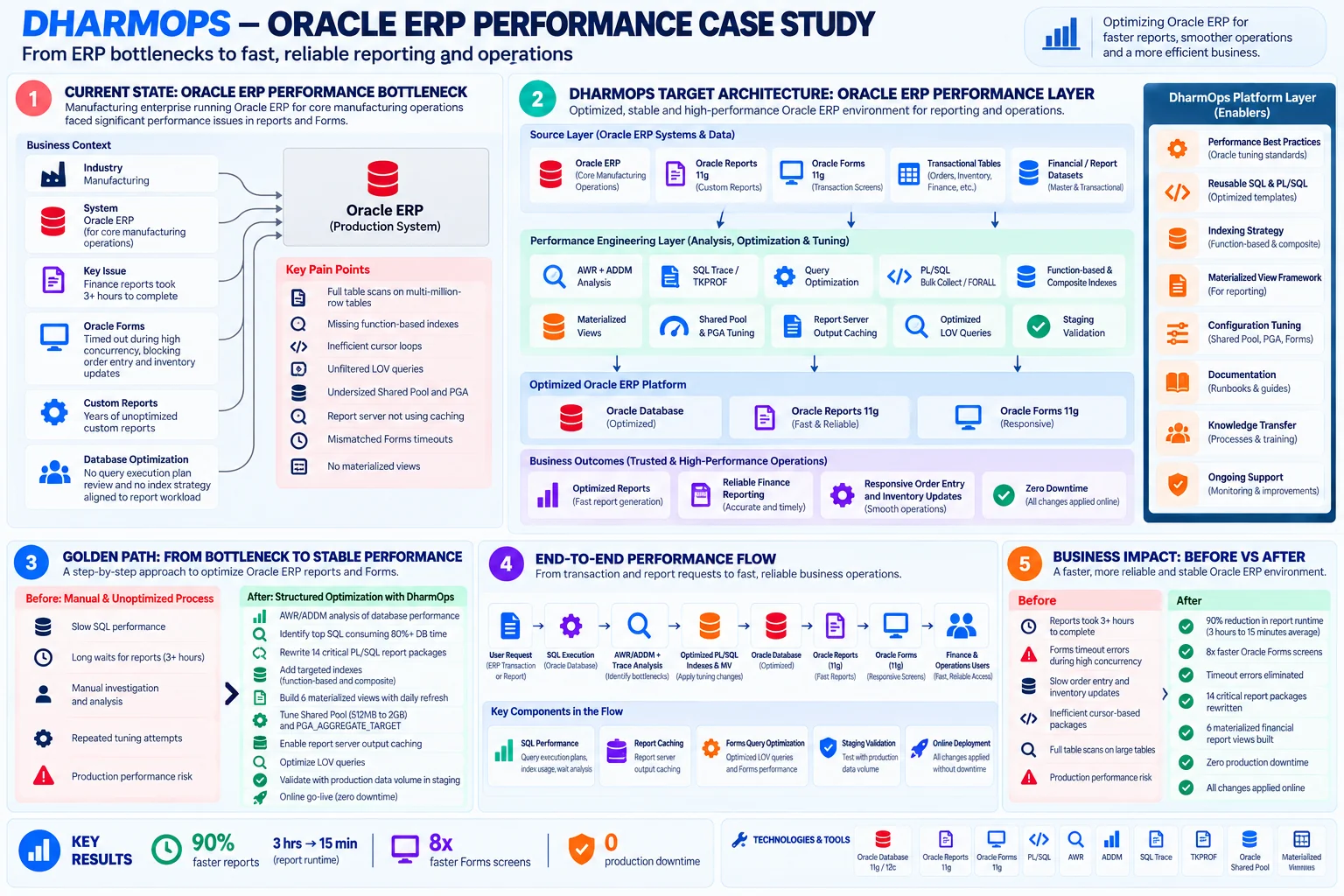
Swipe the diagram sideways to read it.
View diagram full sizeBefore
Oracle Reports and Forms queried multi-million-row tables with full scans, cursor loops and unfiltered LOVs. Reports took 3+ hours and Forms timed out under load.
After
A performance layer of tuned PL/SQL, indexes, materialized views, report caching and sized memory sits between the ERP data and its Reports and Forms. Reports finish in about 15 minutes and Forms screens respond.
Before and After
| Step | Before | After |
|---|---|---|
| Finding slow SQL | Manual investigation and repeated tuning attempts | AWR and ADDM analysis of the statements using 80%+ of DB time |
| Report packages | Row-by-row cursor loops | Bulk collect / FORALL, 14 critical packages rewritten |
| Forms and LOV queries | Full scans and unfiltered LOV queries | Function-based and composite indexes, restricted LOV scope |
| Financial report datasets | Re-aggregated on every run | 6 materialized views with daily refresh |
| Memory and caching | Undersized Shared Pool and PGA; no report output caching | 2GB Shared Pool, tuned PGA, report server caching on |
| Release | Production performance risk with each tuning attempt | Validated in staging at production volume, applied online |
Results
Swipe the table sideways to see the Change column.
| Metric | Before | After | Change |
|---|---|---|---|
| Report runtime | 3+ hours | 15 minutes average | 90% reduction |
| Oracle Forms screens | Timing out under concurrency | 8x faster | Timeouts eliminated |
| Critical report packages | Cursor-based loops | Bulk collect / FORALL | 14 rewritten |
| Aggregated financial reports | No materialized views | 6 materialized views | Daily refresh |
| Shared Pool | 512MB | 2GB | Hard parses reduced |
| Production downtime | Risk with each change | 0 | All changes online |
What changed for the client
- Finance gets end-of-day reports in about 15 minutes instead of 3+ hours.
- Order entry and inventory updates no longer stall on Forms timeouts.
- Report queries run on indexes and materialized views built for the actual workload.
- Nothing was taken offline to get there.
Technology Stack
| Layer | Tool |
|---|---|
| Database | Oracle Database 11g/12c, Shared Pool and PGA tuning |
| Reporting and screens | Oracle Reports 11g, Oracle Forms 11g |
| Application code | PL/SQL (bulk collect / FORALL) |
| Diagnostics | AWR, ADDM, SQL Trace, TKPROF |
| Query acceleration | Function-based and composite indexes, materialized views |
Oracle ERP Performance Questions
How do you speed up slow Oracle Reports on a large ERP schema?
Start with AWR and ADDM to find the SQL statements using the most database time. In this engagement, a handful of statements accounted for 80%+ of it. We then rewrote 14 critical PL/SQL report packages from row-by-row cursor loops to bulk collect / FORALL and added indexes matched to the report queries. Average report runtime fell from 3+ hours to about 15 minutes, a 90% reduction.
Why do Oracle Forms screens time out under high concurrency?
In this case the cause was in the queries, not the timeout setting. Forms queries had no matching function-based indexes, and report parameter forms ran unfiltered LOV queries against large reference tables. Adding function-based and composite indexes on the Forms WHERE-clause columns and restricting LOV query scope made the screens about 8x faster and ended the timeouts.
Do materialized views help Oracle financial reports?
Yes, when the same large aggregates are rebuilt on every run. Six heavily aggregated financial reports were reading millions of rows each time. Materialized views with daily refresh let them read prepared results instead, and Oracle Report server output caching covered the static reference data reports.
Can an Oracle ERP be tuned without downtime?
Yes. Every change here was validated in a staging environment with production data volume, then applied online. The engagement had zero production downtime.
Which Oracle memory settings were wrong in this case?
The Shared Pool and PGA were undersized for the workload, forcing frequent hard parses. The Shared Pool went from 512MB to 2GB and PGA_AGGREGATE_TARGET was tuned to the workload profile, which cut the hard parsing.
How do you use AWR and ADDM to find slow Oracle SQL?
Use the AWR report to rank SQL statements by database time, and ADDM to see where the time goes. Here, a handful of statements used 80%+ of database time, so tuning started with them instead of spreading effort across every report.
Do Oracle Forms and Reports need to be migrated, or can they be tuned?
In this engagement, tuning alone was enough to fix the problem. Reports went from 3+ hours to about 15 minutes and Forms screens became 8x faster with no timeouts, using PL/SQL rewrites, indexes, materialized views and memory sizing, with Forms and Reports left in place and zero downtime.
Waiting hours on Oracle reports or Forms timeouts?
On a diagnostic call we go through your slowest reports and Forms screens and identify which statements are using the database time.
Start with a Discovery Call