By Yash Amin, Founder and CEO · Published · Updated
How we cut a PostgreSQL reporting query from 4 minutes to 17 seconds on a 340GB database
The server wasn't out of capacity. shared_buffers sat at 128MB on a 32GB machine, 48GB of dead rows inflated every scan, and the report query had no index that matched its filters.
- Industry
- Operations platform
- Platform
- PostgreSQL, 340GB
- Engagement
- 4 working days
- Our role
- Database performance engineering
Faster primary report
was 4 minutes, now 17 seconds
Disk space recovered
of dead-row bloat on a 340GB database
Less disk I/O
during peak reporting hours
Downtime
every change applied live
About the Client
An operations platform that had grown for five years into a 340GB PostgreSQL database holding over 200 million rows across its events and activity tables.
Daily operations, reporting and internal tools all read from the same database, so its speed set how fast the business could see its own numbers.
| Detail | Specifics |
|---|---|
| Industry and size | Operations platform, five years of data growth |
| Data volume | 340GB, over 200 million rows, with 180 million in the primary events table |
| Platform | PostgreSQL on a 32GB RAM server |
| Team | In-house team running the platform; configuration had not been revisited as data volume grew |
| State before engagement | Reports took 3–4 minutes and timed out; shared_buffers at 128MB; 48GB of dead-row bloat; work_mem at 4MB |
The Situation
Reporting queries ran for 3 to 4 minutes and frequently timed out. The team could not rely on a report finishing, so ad hoc questions went unasked.
The database was also consuming far more disk I/O than the workload justified, and storage kept filling even though new data volume had not jumped. Latency spikes from the saturated disks reached queries unrelated to reporting.
Indexes existed. The problem kept getting worse anyway, and nothing in the application logs said why.
Challenges
Reports timing out
The primary reporting query ran for up to 4 minutes and frequently failed, so the team stopped running ad hoc reports.
No visibility into the cause
Indexes existed and application logs showed nothing wrong. The causes sat in database configuration and query plans.
Storage and I/O growing without new data
Disk usage kept climbing and I/O saturation caused latency spikes, with no matching rise in data volume.
Reports timing out on a large PostgreSQL database?
Start with a Discovery CallDiagnosis
A DharmOps audit found four compounding causes. None showed up in application logs, and each one made the others worse.
| Finding | Evidence | Effect |
|---|---|---|
| shared_buffers at the 128MB default | Under 0.4% of the 32GB server's memory allocated to the buffer cache | Pages were fetched from disk on almost every query |
| Autovacuum misconfigured on high-write tables | Default scale factor of 0.2 on a 180M-row table: 36M dead tuples before any cleanup | 48GB of dead data inflating every scan and weakening index efficiency |
| Sequential scans on the events table | Index on (status) alone; the report also filtered by date range, so the planner ignored it | Every report read all 180M rows |
| work_mem at the 4MB default | EXPLAIN ANALYZE showed 'Sort Method: external merge Disk: 2048kB' | Multiple disk sorts per report on top of the sequential scan |
The report query filtered on a date range and a status column. The only index was on status alone, so the planner ignored it and read all 180 million rows, through 48GB of dead data, with every sort spilling to disk.
What We Did
Every change was applied live, with no maintenance window and no schema migration.
Tuned memory: shared_buffers 128MB to 8GB, effective_cache_size 24GB
Raised shared_buffers to 25% of RAM so frequently read pages stay in memory, and set effective_cache_size so the planner prices index scans accurately. This removed the disk fetches behind most of the I/O. Reporting sessions also got work_mem at 128MB, which ended the disk spills in sorts and hash operations.
Fixed autovacuum per table and reclaimed 48GB
Set autovacuum_vacuum_scale_factor to 0.01 on the three largest tables, so cleanup starts after 1% of rows are dead instead of 20%. A manual VACUUM ANALYZE reclaimed the existing 48GB of bloat. Scans now read live data only, and bloat stops rebuilding.
Built a covering partial index on (created_at, status)
The index matches the report's date-range and status filters in column order, and was built CONCURRENTLY with no table locking. The report went from a full scan of 180M rows to an index scan over about 50,000.
Partitioned the events table by month
Declarative monthly range partitions let queries that filter by date skip the months they don't need, instead of scanning five years of history. The cutover used a dual-write pattern, running the old and new structures in parallel until the switch was confirmed stable.
Architecture: Before and After
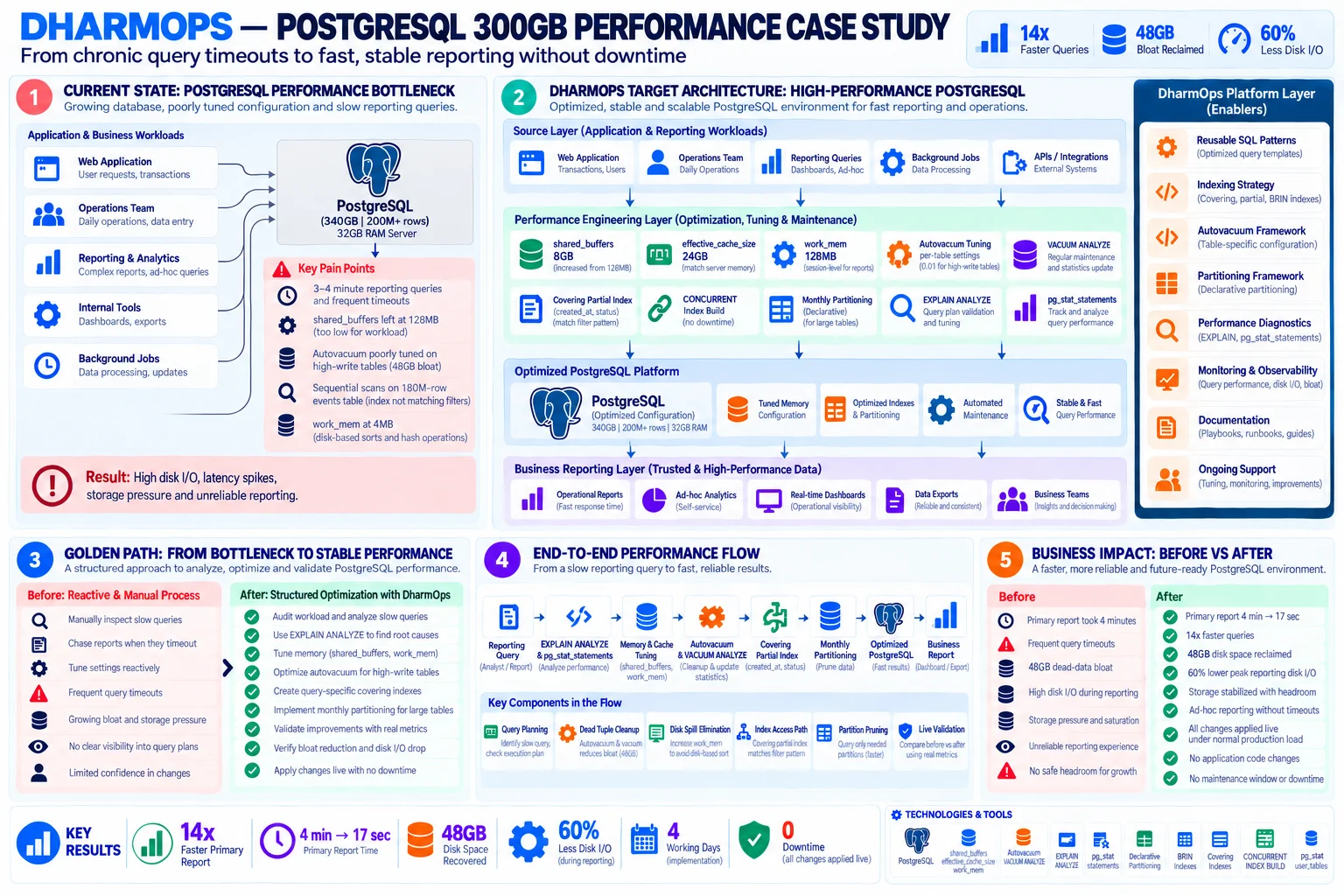
Swipe the diagram sideways to read it.
View diagram full sizeBefore
The web application, operations team, reporting and background jobs all hit one 340GB database on a 32GB server. Default memory settings, 48GB of bloat and sequential scans on the 180M-row events table meant high disk I/O, latency spikes and unreliable reports.
After
The same workloads run against a tuned instance: sized memory, per-table autovacuum, a covering partial index and monthly partitions. Reports serve operational dashboards, ad hoc analytics and exports in seconds.
Implementation Timeline
The full engagement took four working days.
Audit and baselining
Identified slow queries with pg_stat_statements, read query plans with EXPLAIN ANALYZE, and recorded baseline report time, bloat and disk I/O.
Memory and autovacuum
Applied the shared_buffers, effective_cache_size, work_mem and per-table autovacuum changes, then ran VACUUM ANALYZE to reclaim bloat.
Index and partitioning
Built the covering partial index concurrently and moved the events table to monthly partitions using the dual-write cutover.
Validation
Compared report time, bloat and disk I/O against the baseline using live production metrics.
Handover and documentation
Documented the settings, maintenance approach and monitoring so the team can keep the database in this state.
Before and After
| Step | Before | After |
|---|---|---|
| Finding slow queries | Manual inspection, chasing reports after they timed out | pg_stat_statements and EXPLAIN ANALYZE audit |
| Memory configuration | PostgreSQL defaults: 128MB shared_buffers, 4MB work_mem | 8GB shared_buffers, 24GB effective_cache_size, 128MB work_mem for reports |
| Dead row cleanup | Autovacuum waited for 20% of rows to be dead | Cleanup at 1% on the three largest tables |
| Report filtering | Sequential scan of 180M rows | Index scan over about 50,000 rows |
| Historical data | Queries scanned five years of events | Partition pruning reads only the months needed |
| Making changes | Reactive, with limited confidence in each change | Applied live and validated against real metrics |
Results
| Metric | Before | After | Change |
|---|---|---|---|
| Primary report time | 4 minutes | 17 seconds | 14x faster |
| Query timeouts | Frequent | Ad hoc reports run without timeouts | Reliable reporting |
| Disk space | 48GB of dead-row bloat | 48GB reclaimed | Bloat cleared |
| Peak reporting disk I/O | Saturated, causing latency spikes | 60% lower | −60% |
| Downtime during changes | Not applicable | None; applied under production load | 0 |
| Application code changes | Not applicable | None required | 0 |
Tradeoffs and What We'd Do Differently
work_mem is set per session, not globally
Raising work_mem to 128MB for every connection risks memory pressure under concurrency. We applied it to reporting sessions and kept the 4MB default for transactional work.
Partitioning ran two structures in parallel
The dual-write cutover kept the migration live, but the old table and the new partitioned one ran side by side until the switch was confirmed stable.
Per-table autovacuum means more frequent vacuum runs
A 0.01 scale factor on the three largest tables triggers cleanup far more often than the default. That frequent, small cleanup is what keeps bloat from rebuilding.
The covering index adds write and storage cost
It speeds the report but is one more structure to update on every write to the events table, which is why it matches the one query that mattered.
Technology Stack
| Layer | Tool |
|---|---|
| Database | PostgreSQL |
| Memory configuration | shared_buffers, effective_cache_size, work_mem |
| Maintenance | autovacuum tuning, VACUUM ANALYZE |
| Diagnostics | EXPLAIN ANALYZE, pg_stat_statements, pg_stat_user_tables |
| Indexing | Covering and partial indexes, BRIN indexes, CONCURRENT index build |
| Data layout | Declarative partitioning |
PostgreSQL Performance at Scale
Why is my PostgreSQL database slow with 100GB, 200GB, or 300GB of data?
The most common causes at scale are: shared_buffers left at the 128MB default (meaning PostgreSQL reads almost everything from disk instead of memory); table bloat from misconfigured autovacuum, since the default autovacuum_vacuum_scale_factor of 0.2 means 20% of a table's rows must be dead before cleanup runs, so a 180M-row table accumulates 36M dead tuples before any cleanup occurs; sequential scans because the index doesn't cover the query's full filter pattern; and work_mem at 4MB, causing every sort and hash operation to spill to disk.
What should shared_buffers be set to for a large PostgreSQL database?
25–40% of total RAM. PostgreSQL's default of 128MB is severely undersized for production workloads. A 32GB RAM server should use 8GB–12GB. Also set effective_cache_size to 50–75% of RAM so the query planner accurately estimates the cost of index scans versus sequential scans.
How do I fix autovacuum for a large PostgreSQL table?
Set autovacuum_vacuum_scale_factor to 0.01 at the table level for large tables. The default of 0.2 waits until 20% of rows are dead, which on a 200M-row table is 40M dead tuples. Use ALTER TABLE t SET (autovacuum_vacuum_scale_factor = 0.01, autovacuum_analyze_scale_factor = 0.005). Then run VACUUM ANALYZE manually to reclaim existing bloat immediately.
How do I stop PostgreSQL reports from timing out on a large database?
Four changes address the most common causes: raise shared_buffers to 25% of RAM; increase work_mem for reporting sessions (SET work_mem = '128MB') to eliminate disk sorts; create a partial composite index covering the full WHERE clause of your primary reporting query; and fix autovacuum so bloat stops inflating sequential scan costs. Table partitioning by time range provides a further 50–60% improvement for queries that only need recent data.
Can PostgreSQL handle a 300GB database, or do I need to migrate to a different database?
PostgreSQL handles 300GB and multi-terabyte databases well when tuned correctly. Most problems at this scale are configuration issues, not architectural limits. Migration to a different database is rarely the right answer before shared_buffers, autovacuum, and indexing have been addressed. Table partitioning is the right structural step for very large tables and can be done live without downtime.
How do I partition an existing PostgreSQL table without downtime?
Create the new partitioned structure alongside the old table and run both in parallel with a dual-write cutover until the switch is confirmed stable. In this engagement, a 180M-row events table moved to declarative monthly range partitions this way. Queries that filter by date now skip the months they don't need, instead of scanning five years of history.
Why do PostgreSQL queries time out, and how do I find the cause?
Start with EXPLAIN ANALYZE on the slow query and pg_stat_statements to find the statements using the most time. Two signs showed up here: a sequential scan across 180M rows, because the index covered status but not the date-range filter, and 'Sort Method: external merge Disk', meaning work_mem was too small and sorts spilled to disk. Fixing the index, work_mem, shared_buffers and autovacuum took the primary report from 4 minutes to 17 seconds.
What are autovacuum best practices for large, write-heavy PostgreSQL tables?
Set autovacuum scale factors per table, not globally: autovacuum_vacuum_scale_factor of 0.01 and autovacuum_analyze_scale_factor of 0.005 on the largest tables, so cleanup starts at 1% dead rows instead of 20%. Run one manual VACUUM ANALYZE to clear existing bloat, then watch pg_stat_user_tables to confirm autovacuum keeps up. On three tables this reclaimed 48GB.
Seeing slow reports on a large PostgreSQL database?
On a diagnostic call we go through your database size, slow queries and current memory, autovacuum and index settings, and find which causes apply to you.
Start with a Discovery Call