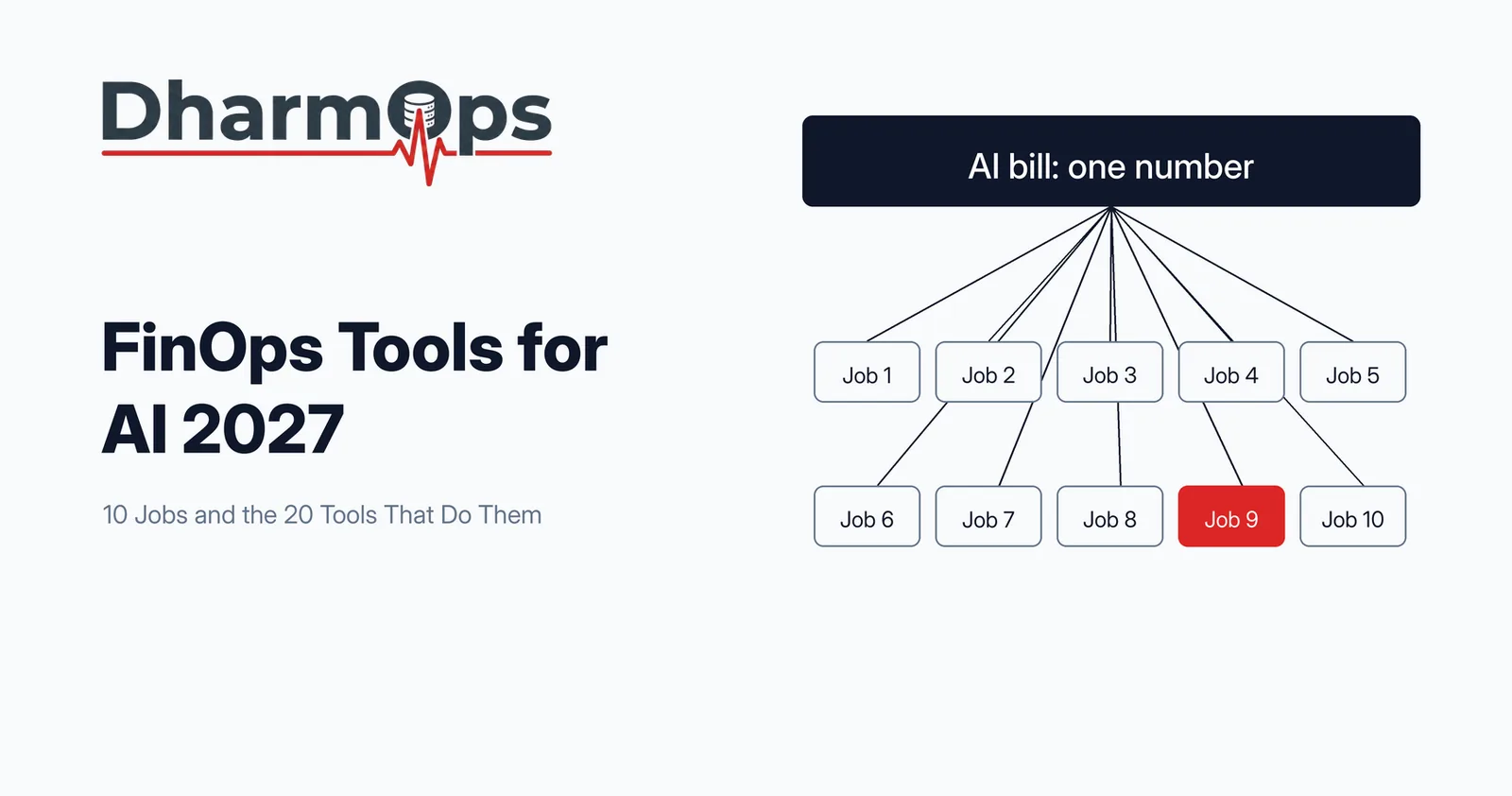
Your CFO asks how much each team spends on AI. You open the provider console and find one monthly total and a line that keeps going up. Two squads share one API key, so their spend lands on the same line. The cost tool that splits your EC2 bill by tag in a few clicks shows nothing below the key.
Most FinOps teams now deal with this. In the State of FinOps 2026 survey of 1,192 practitioners, 98% said they manage AI spend, up from 31% two years earlier. They named AI cost management the top skill their teams need to build.
The tools lag behind. The FinOps Foundation's own comparison shows that provider consoles and FinOps platforms attribute AI spend by key or project, not by team or feature. And 4 of the 6 tool lists we read rank their author's product first.
The spend keeps reaching more of the business. By May 2026, 37% of US firms with 250 or more employees used AI in their operations, according to the US Census Bureau.
This guide groups 20 FinOps tools for AI by the job each one does, and links every claim to the vendor's own docs. You'll see why per-team AI cost breaks, what FOCUS 1.5 changes in 2027, which tools cover model APIs, coding tools, GPUs and Snowflake or Databricks, and a five-step way to choose.
Can't split your AI bill by team? Book a 30-minute discovery call →
Jump to: All 20 tools · Why per-team cost breaks · 2027 changes · Tools by job · 5 steps
The 20 FinOps tools for AI at a glance
Each row is a job. Click a job to jump to the tools that do it.
| Job | Tools that do it | Pricing model |
|---|---|---|
| 1. Start with the agent your cloud already has | AWS FinOps Agent, Google FinOps hub and Gemini Cloud Assist | Bundled with the cloud; the AWS agent has no charge during preview |
| 2. Estimate Azure OpenAI spend before it lands | Azure Copilot in Cost Management | Bundled with Azure |
| 3. One bill across cloud, AI APIs and coding tools | Finout, Datadog, CloudZero, Flexera, nOps, DoiT, IBM Cloudability | Spend tier, per $1,000 of spend, or quote |
| 4. Let an agent act, with approval | Vantage | Platform plan |
| 5. Enforce hard limits | Kion, LiteLLM, Portkey | Quote, open source, Enterprise plan |
| 6. Measure cost per outcome | DoiT, nOps, CloudZero | See job 3 |
| 7. Buy commitments for AI infrastructure | ProsperOps, plus nOps, Vantage, Flexera | Share of realized savings |
| 8. Allocate GPU cost on Kubernetes | OpenCost, IBM Kubecost | Open source; Enterprise for GPU optimization |
| 9. Track AI spend inside Snowflake and Databricks | Snowflake Cortex usage views, Databricks Unity Gateway | Consumption; Databricks bills for usage tracking |
| 10. See cost per request inside the app | Helicone, plus Datadog Agent Observability | Open source; Datadog plan |
Source: each vendor's own documentation, linked in the tool entries below. Read on 25 and 26 November 2026.
What counts as a FinOps tool for AI
"AI FinOps" means two different things, and most vendors sell both under one label. The FinOps Foundation keeps them apart.
FinOps for AI vs AI for FinOps
FinOps for AI is managing the cost and value of AI: tokens, GPUs, model APIs and AI coding tools. AI for FinOps is, in the Foundation's words, "applying generative and agentic AI to FinOps work". That means agents that answer cost questions, investigate anomalies or buy commitments for you.
A tool can do one, the other, or both. AWS FinOps Agent is AI for FinOps: it uses AI to explain your AWS bill. LiteLLM is FinOps for AI: it caps what your apps spend on models. When you compare tools, check which half each one covers.
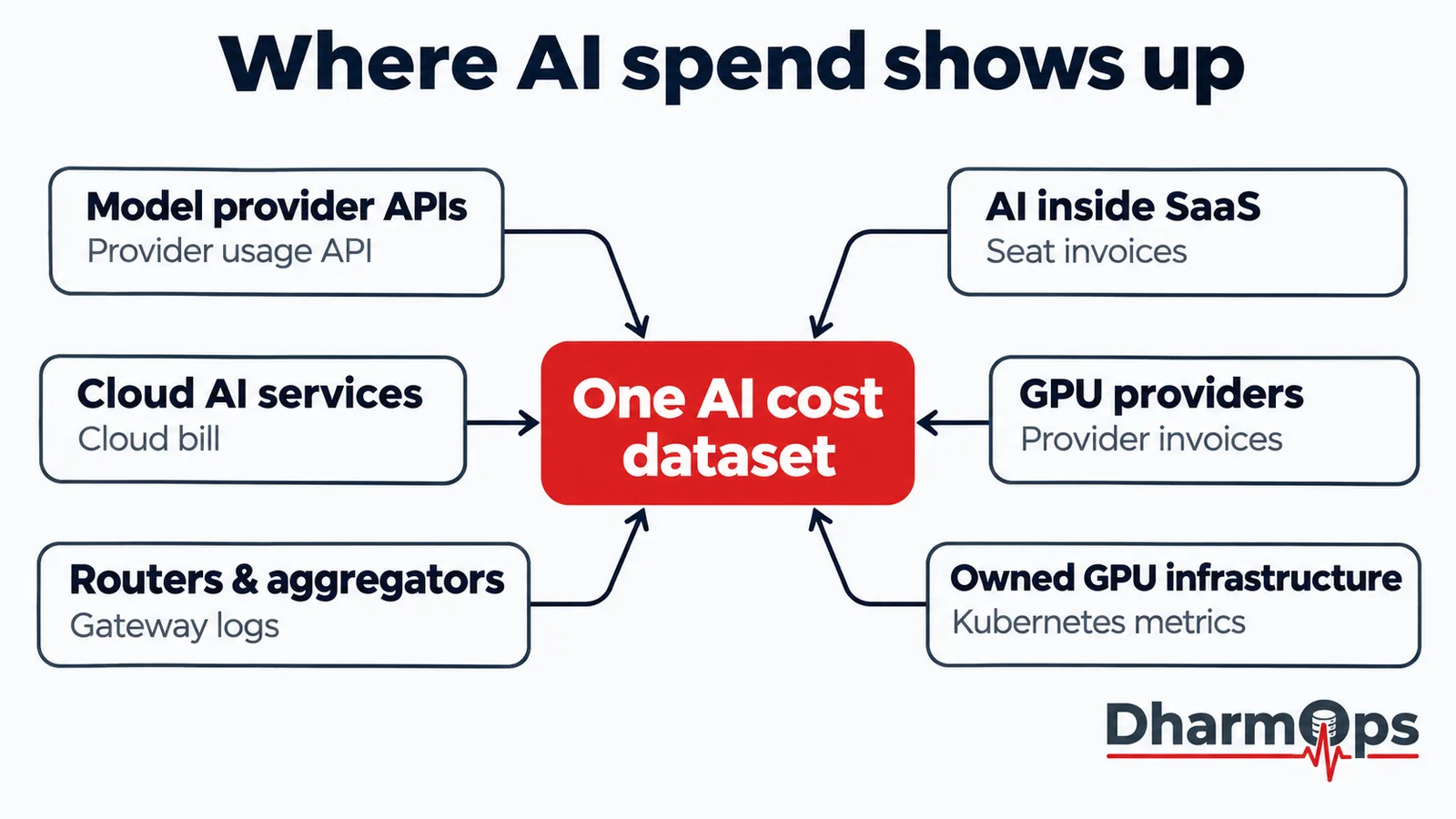
The six places AI spend shows up
The Foundation's FinOps for AI Overview lists six channels. Each one bills differently and puts its data somewhere else.
| Channel | Example | Where the cost data lives |
|---|---|---|
| Direct model provider APIs | OpenAI, Anthropic, Gemini APIs | Provider console and usage API |
| Cloud provider model services | Amazon Bedrock, Azure AI Foundry, Vertex AI | Your cloud bill |
| Model routers and aggregators | OpenRouter, LiteLLM | Router logs or one prepaid invoice |
| AI inside SaaS | Cursor, Claude Code, GitHub Copilot | Seat invoices and admin exports |
| GPU providers | Rented GPU capacity | Provider invoices |
| Owned AI infrastructure | Your own GPU clusters | Cloud bill plus Kubernetes metrics |
Source: FinOps Foundation, FinOps for AI Overview, updated Oct 28, 2026.
So FinOps isn't only for cloud anymore. A tool that reads your AWS bill sees the second row and part of the sixth. The rest sits elsewhere.
Why your cloud FinOps tool can't show AI spend by team
Cloud FinOps works because every resource carries tags. AI spend mostly doesn't. Four things get in the way.
Attribution depth: key, project, workload, request
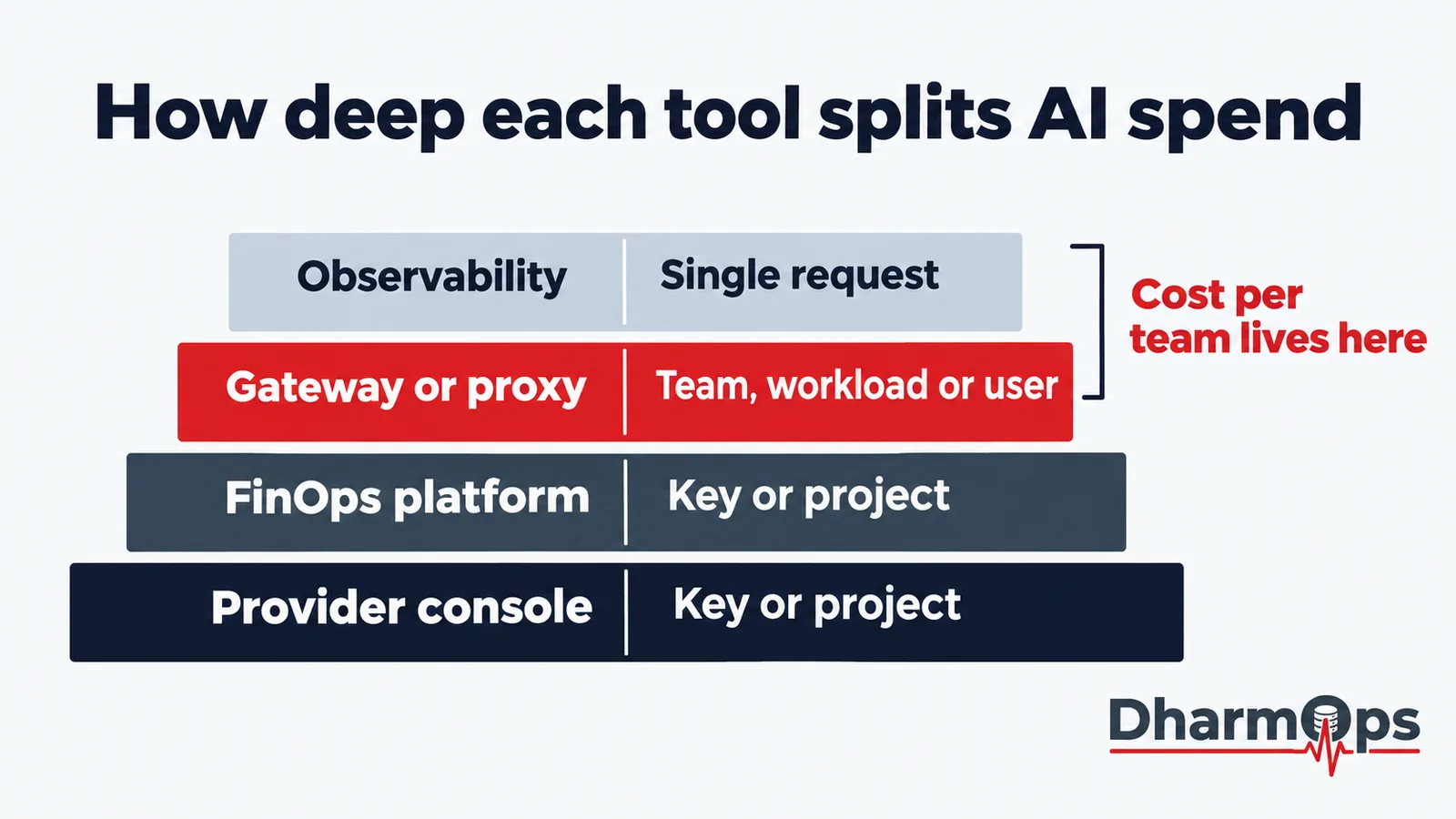
The Foundation's token cost paper compares tool categories by how deep they can split spend.
| Tool category | Splits spend by | Build effort | Fits |
|---|---|---|---|
| Provider consoles and usage APIs | Key, project or workspace | None | Getting started |
| Proxies, gateways, routers | Workload or user | Low to medium | Engineering-led teams |
| Observability and evaluation | Request | Low | Development teams |
| FinOps platform integration | Key or project | None | Finance-led governance |
| Custom data warehouse | Anything you model | High | Data-mature teams |
Source: FinOps Foundation, Managing AI Token Costs from Direct Model Provider APIs.
Read the second column. A FinOps platform alone gets you to key or project. Cost per team or per feature needs a gateway, per-team keys or your own data model underneath.
Shared API keys and shared gateway roles
The most common blocker is simple. Several teams share one key, so the invoice can't split them. One practitioner on r/FinOps described "4 teams sharing 2 keys", where "team-A versus team-B was literally uncomputable from the invoice side."
A shared gateway creates the same problem one layer down. If every Bedrock call goes through one service role, your AWS cost data sees one identity. The fixes are per-team keys, a proxy that stamps a team ID on each call, or session tags set at the gateway.
AI spend that sits inside Snowflake and Databricks
AI now runs inside the data platform too. Snowflake Cortex functions and agents, and Databricks model and agent traffic, show up as warehouse consumption. The detail lives in system tables: Snowflake's Cortex usage views and Databricks' system.ai_gateway.usage. Most teams never query them, so this spend has no owner. None of the five pages ranking for this topic mention it.
Why daily billing misses agent loops
AI anomalies move fast. A runaway agent or a prompt change can double token use in an afternoon. The Foundation advises monitoring "tokens per minute at the application level, not only daily spend." Databricks says its usage records arrive "typically within one hour." Cloud billing takes longer. A tool that reads the daily bill will see the loop after it has run.
Related: Database FinOps guide
What changes for FinOps tools in 2027
Three changes land around the turn of the year. Each one changes what you should ask a vendor.
FOCUS 1.5 gives AI costs a shared label set
FOCUS is the FinOps Foundation's open specification for billing data. Token counts have been in it since version 1.0. Version 1.5, set for ratification on December 3, 2026, adds the labels that make AI costs comparable, per the Tokenomics Foundation's scope page:
- Model identity: developer, model family, model ID as billed, version
- Cache status and input/output direction on token prices
- Requester attribution: the principal and credential behind each cost row
- Consumption currency for provider credits
Version 1.5 leaves out reasoning tokens as a dimension, provisioned throughput, context window size and inference tiers. Until providers emit 1.5 natively, someone still maps each provider's meter names by hand.
AI agents move from answering to acting
The agents in FinOps tools do different things:
| Agent | Answers cost questions | Finds root cause | Takes action |
|---|---|---|---|
| AWS FinOps Agent | Yes | Yes, matched to CloudTrail | No, files Jira tickets |
| Vantage FinOps Agent | Yes | Yes | Yes, with approval |
| Kion FinOps+ | Dashboard | Not stated | Threshold controls |
| Azure Copilot | Yes | Not stated | No |
| Gemini Cloud Assist | Yes (Preview) | Explains cost changes | No |
Sources: AWS, Vantage, Kion, Microsoft, Google Cloud.
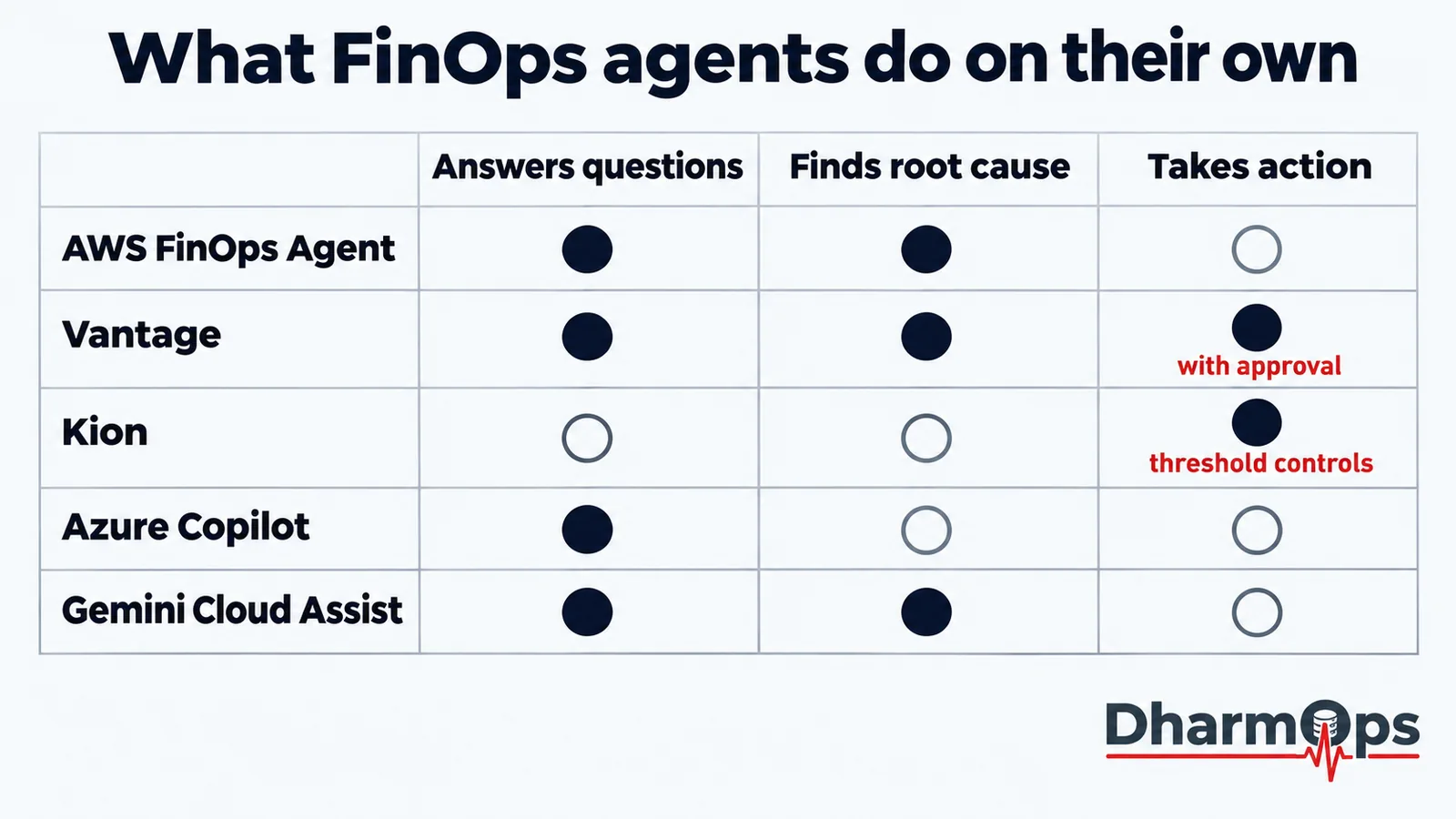
The Foundation's guidance on AI for FinOps puts the open question plainly: decide "who reviews their output and how far their authority extends."
More vendors fold AI spend into the main bill
In November 2026 alone, Kion released FinOps+ v4.0 with AI Insights, IBM added AI cost features to Cloudability, and Databricks updated its usage tracking docs. Tool lists written in mid-2026 miss all three.
FinOps tools for AI by job: 20 tools, 10 jobs
Each tool appears once in full, under the first job it does. Other jobs point back to it. Every entry uses the vendor's own documentation.
Job 1: Start with the agent your cloud already has
AWS FinOps Agent
- What it does: an agent built on Amazon Bedrock that answers cost questions across an AWS Organization, matches cost spikes to CloudTrail events, and files the cause and owner to Jira or Slack. It also schedules reports in HTML, PDF or PPT.
- Covers: AWS only, including recommendations from Cost Optimization Hub and Compute Optimizer.
- Tradeoff: it's in preview and "subject to change", and "not yet in scope for AWS compliance programs". It files tickets but doesn't make changes.
- Pricing: no charge for the agent during preview. You pay "the standard per-request rate" for the AWS APIs it calls.
- Docs: What is AWS FinOps Agent (preview)?
Google Cloud FinOps hub and Gemini Cloud Assist
- What it does: FinOps hub shows a FinOps score, committed-use discount optimization and utilization insights. Gemini Cloud Assist explains cost changes per app or project.
- Covers: Google Cloud only.
- Tradeoff: the Gemini cost feature is Preview. Google's own doc says Gemini "can generate output that seems plausible but is factually incorrect" and recommends you "validate all output". App-level views need folders set up for application management.
- Pricing: part of Google Cloud billing tools.
- Docs: Optimize costs with Gemini assistance
Job 2: Estimate Azure OpenAI spend before it lands
Azure Copilot in Microsoft Cost Management
- What it does: natural-language cost summaries, breakdowns by service, region or meter, three-month forecasts and savings recommendations. For token-based OpenAI models it "can provide simulations that estimate your costs for increasing or decreasing usage", including switching models.
- Covers: Azure only.
- Tradeoff: the doc examples use older model names (GPT-35-Turbo to GPT-4), so check that it covers your models.
- Pricing: part of the Azure portal.
- Docs: Analyze, estimate and optimize cloud costs using Azure Copilot
Job 3: One bill across cloud, AI APIs and coding tools
Finout
- What it does: a "MegaBill" that joins cloud, Kubernetes, SaaS and AI spend. It splits AI spend into four layers: cloud AI services, direct provider contracts, token-based developer tools, and AI inside existing SaaS.
- Covers: Bedrock, Vertex AI, Azure OpenAI, OpenAI and Anthropic, plus Portkey and LiteLLM gateway data and Kubernetes down to GPU and pod.
- Tradeoff: custom quote only. Kubernetes is an add-on.
- Pricing: a flat annual fee based on your committed cloud and AI spend tier. Finout says it's "not priced per seat" and not a percentage of the bill.
- Docs: Finout FinOps for AI
Datadog Cloud Cost Management: AI Costs
- What it does: brings billed AI spend into Datadog with normalized tags and anomaly tracking, and attributes usage "to the specific users and API keys driving it."
- Covers: Bedrock, SageMaker, Anthropic, Azure Foundry, ChatGPT Enterprise (Preview), Cursor, Databricks Mosaic AI, GitHub Copilot, Gemini, Kiro, OpenAI (Platform only), Snowflake AI and Vertex AI.
- Tradeoff: Cursor import needs a Cursor Enterprise plan with a team admin. Datadog estimates ChatGPT Enterprise costs during Preview.
- Pricing: the entry tier covers Datadog's own costs only. Pro starts at $5 per $1,000 of cloud and SaaS spend per month, billed annually (pricing).
- Docs: Datadog Cloud Cost Management
CloudZero
- What it does: allocates AI spend from providers, gateways and cloud bills to teams, features, users and customers, and sets budgets and alerts on those dimensions instead of one company cap. It promises that "the totals add up to your bill."
- Covers: Anthropic, OpenAI, Cursor, Snowflake, Databricks, Datadog and Kubernetes, among others.
- Tradeoff: the statistics on its page are its own customer claims. One example: a single employee spending $600K a year across 40 models.
- Pricing: on request.
- Docs: CloudZero AI cost governance
Flexera One AI Cost Management
- What it does: covers AI apps and agents, models and tokens, AI data clouds and AI compute in one place. It finds AI apps in use, tracks seat use (such as unused Copilot seats) and tracks tokens across Anthropic, OpenAI, Gemini, Bedrock and Azure OpenAI.
- Covers: also Databricks and Snowflake workload optimization, commitment management and Kubernetes GPU rightsizing.
- Tradeoff: Flexera's own capability table rates its AI policy and governance and its autonomous action in AI as "Partial".
- Pricing: quote.
- Docs: Flexera AI Cost Management
nOps
- What it does: hourly AI cost attribution with anomaly flags at "3× over its same-hour baseline", token splits by input, output and cache, and attribution for Cursor, Claude Code and OpenAI Codex with "no tagging changes required".
- Covers: AWS-centered rate optimization, plus model substitution and cache tuning recommendations, an API and MCP access.
- Tradeoff: its savings figures are its own marketing claims.
- Pricing: visibility is a fixed fee based on cloud spend. Rate optimization is a share of realized savings. 14-day trial.
- Docs: nOps AI Cost & Attribution
DoiT Cloud Intelligence: AI Hub
- What it does: cost per solved AI task ("Taskonomics") by team, user and repository, with 16 AI connectors and "No SDK changes."
- Covers: OpenAI, Anthropic, Cursor, OpenRouter, LiteLLM, Bifrost, Vast.ai and RunPod, plus Snowflake, Databricks and BigQuery.
- Tradeoff: DoiT also sells consulting services, so it competes with the firms that might implement it. The dollar-per-task figures on its product page are demo screens.
- Pricing: an Essentials tier at no cost with an "Agentic FinOps Analyst", anomaly detection and allocation. Higher tiers are bespoke.
- Docs: DoiT AI Hub
IBM Cloudability
- What it does: enterprise cost platform with AI application costing, token visibility, AI budgeting and forecasting, unit economics, and an AI Assistant for plain-English questions.
- Covers: the OpenAI API Platform, OpenAI Codex (credits you price yourself), Anthropic (including cache tokens), Cursor and GitHub Copilot, plus cloud AI services through the AWS, Azure and GCP connections. Snowflake and Databricks connect as SaaS sources.
- Tradeoff: per IBM's docs, "The default connector mapping does not ingest user_id or user_email." You ask Apptio to turn on user-level data.
- Pricing: quote.
- Docs: New Cloudability capabilities for AI costs
Job 4: Let an agent act, with approval
Vantage FinOps Agent
- What it does: an agent in the Vantage console and Slack that answers cost questions, creates Cost Reports, Budgets and Virtual Tags, and acts with "optional approval". It's generally available for commitment purchases (AWS Compute Savings Plans, and Reserved Instances for RDS, OpenSearch, ElastiCache and Redshift) based on a target coverage you set in plain language.
- Covers: multi-cloud cost data, with MCP connectors to Datadog, GitHub, Linear and Notion for context.
- Tradeoff: remediation and approvals run through the Slack surface. Commitment buying is AWS-focused.
- Pricing: part of the Vantage platform.
- Docs: Vantage FinOps Agent
Job 5: Enforce hard limits
Kion FinOps+ v4.0
- What it does: an AI Insights dashboard for spend, tokens, cache efficiency and requests. It rolls AI spend up to one person by email, and uses LiteLLM data to "estimate spend between billing updates in real time."
- Covers: threshold controls that switch off AI services in an account, keep GPU instances out of sandbox and dev, restrict Bedrock models, and shut idle SageMaker and Vertex AI Workbench notebooks after hours.
- Tradeoff: released November 23, 2026, so field reports are still thin. It's self-hosted, which adds work for your team.
- Pricing: quote.
- Docs: Kion FinOps+ v4.0 announcement
LiteLLM proxy
- What it does: an AI gateway with virtual keys and budgets at global, team, team-member, key and agent level. Agent budgets add rate limits and session caps on iterations and dollars.
- Covers: any model you route through it. Kion and Finout both read its data.
- Tradeoff: LiteLLM's docs say "Budgets require a database." Without one,
max_budget"fails open" and requests keep flowing past the limit, with only a startup warning. - Pricing: open source.
- Docs: LiteLLM Budgets, Rate Limits
Portkey AI Gateway
- What it does: cost and token budgets per provider integration and workspace. A USD budget "will automatically expire the key" once reached. Alerts fire at thresholds you set, with weekly or monthly resets.
- Covers: any provider routed through Portkey. Finout reads Portkey data.
- Tradeoff: you can't edit a limit once you set it, so you duplicate the provider to change one. Limits don't apply to past usage.
- Pricing: budget limits are "only available to Portkey Enterprise Plan customers" and select Pro plans.
- Docs: Portkey Budget Limits
Job 6: Measure cost per outcome
Total AI spend tells finance little. Cost per outcome tells it whether the spend works. Three tools from job 3 measure it:
- DoiT: cost per solved task, by team, user and repository
- nOps: cost per merged pull request
- CloudZero: cost per customer, for SaaS margin decisions
The Foundation advises tracking "cost per inference, per user, and per successful outcome" and reporting them "as distributions, since AI costs vary from run to run." Have a business owner, not the FinOps team, own the outcome metric.
Job 7: Buy commitments for AI infrastructure
ProsperOps
- What it does: automated commitment management across AWS, Azure and Google Cloud. ProsperOps is a Flexera company.
- Covers: one AI service directly, Vertex AI on Google Cloud. On AWS and Azure it covers general compute and databases, not Bedrock, SageMaker or Azure OpenAI.
- Tradeoff: it has no token or AI attribution. Pair it with an attribution tool.
- Pricing: "a small percentage of the realized savings... not a percentage of your cloud spend."
- Docs: How ProsperOps works
nOps (rate optimization), Vantage (agent-driven purchases) and Flexera (commitment management) also do this job. The Foundation's order: right-size models first, then caching and batching, and buy commitments only "after you have a reliable baseline."
Job 8: Allocate GPU cost on Kubernetes
OpenCost
- What it does: a vendor-neutral way to split Kubernetes cluster cost, GPUs included, across tenants. Total cluster cost equals asset costs plus overhead. Node cost is CPU, GPU, RAM and network.
- Covers: Kubernetes only. It doesn't see token spend.
- Tradeoff: you run it and model the allocation yourself.
- Pricing: open source.
- Docs: OpenCost Specification
IBM Kubecost
- What it does: GPU use (average and max) per container, pod and cluster, with Optimize, Remove and Share recommendations.
- Covers: Kubernetes, including network cost detail added in November 2026.
- Tradeoff: GPU optimization is "a Kubecost Enterprise feature".
- Pricing: Enterprise for GPU optimization.
- Docs: Kubecost GPU Optimization
Job 9: Track AI spend inside Snowflake and Databricks
Snowflake Cortex AI usage views
- What it does: account and organization views for AI features, including
AI_GATEWAY_USAGE_HISTORY,CORTEX_AGENT_USAGE_HISTORYandCORTEX_AI_FUNCTIONS_USAGE_HISTORY. - Covers: Snowflake AI spend, in the same warehouse that already holds your finance data.
- Tradeoff: history starts on different dates per view (agent data from November 10, 2025, AI functions from January 5, 2026), so long trends are uneven.
- Pricing: AI features bill by consumption, tokens included.
- Docs: Snowflake AI cost management and governance
Databricks Unity Gateway usage tracking
- What it does: the
system.ai_gateway.usagetable records requester, service, status, tokens, latency, MCP calls and coding-agent sessions, with a built-in dashboard. - Covers: model and agent traffic that runs through Databricks.
- Tradeoff: records arrive "typically within one hour", and viewing needs account and metastore admin rights by default.
- Pricing: "Usage tracking is a billed Unity Gateway feature."
- Docs: Databricks Track model usage
Flexera, Datadog, CloudZero, DoiT and Cloudability can pull this data into a wider bill. The raw tables are still the most detailed source, and they're plain SQL.
Job 10: See cost per request inside the app
Helicone
- What it does: request- and session-level LLM cost tracking. Sessions group calls into one workflow, such as one support ticket. Custom properties split cost by user tier, feature or environment.
- Covers: any model routed through its gateway, or 300+ models through its open-source price list.
- Tradeoff: costs come from list prices, not your invoice, so reconcile them to the bill.
- Pricing: open source.
- Docs: Helicone Cost Tracking
Datadog Agent Observability does the same job for teams already on Datadog. It estimates the cost of each LLM request from public prices and splits cached, cache-read and cache-write tokens.
Related: LLMOps guide, Data warehouse cost in 2026
Not Sure Which of These Jobs You Need First?
We'll look at where your AI spend comes from and which jobs actually apply to you before you buy anything.
Book a Discovery CallThree situations and the tools that fit each
The same tool can be the right answer in one company and wasted money in another. These three situations come up again and again.
The CFO wants AI spend by team, and teams share keys
Before: one provider invoice, two keys shared across four teams, no way to split it.
Fit: give each team its own key, or route calls through a gateway that stamps a team ID (job 5). Feed that data into a cost platform (job 3) so finance sees it next to cloud spend. One r/FinOps commenter called per-team keys behind a small proxy "the fix that took the least engineering time."
After: spend by team, from the invoice up, with agent overhead on its own line.
Four engineers drive most of the AI coding bill
Before: one engineering manager on r/ClaudeCode pulled a month of usage for 54 engineers: $6,400, about $4 a day per head. Then they sorted by person. "4 engineers were 80% of the spend, and one of them alone was 31%." Seats showed no per-request cost.
Fit: a tool that rolls coding-tool spend up to a person. Kion does it by email. Datadog and Cloudability import Cursor and Copilot. nOps attributes Cursor, Claude Code and Codex.
After: a median and a distribution for budgeting, not an average that nobody actually sits at.
AI functions run inside the warehouse
Before: Cortex functions or Databricks agents grow the warehouse bill, and nobody can say which team or job caused it.
Fit: model the system tables from job 9 next to your finance data. Join the requester column to your team directory, and you get cost per team without a new platform.
After: AI spend in the warehouse shows up in the same reports as the rest of the data platform.
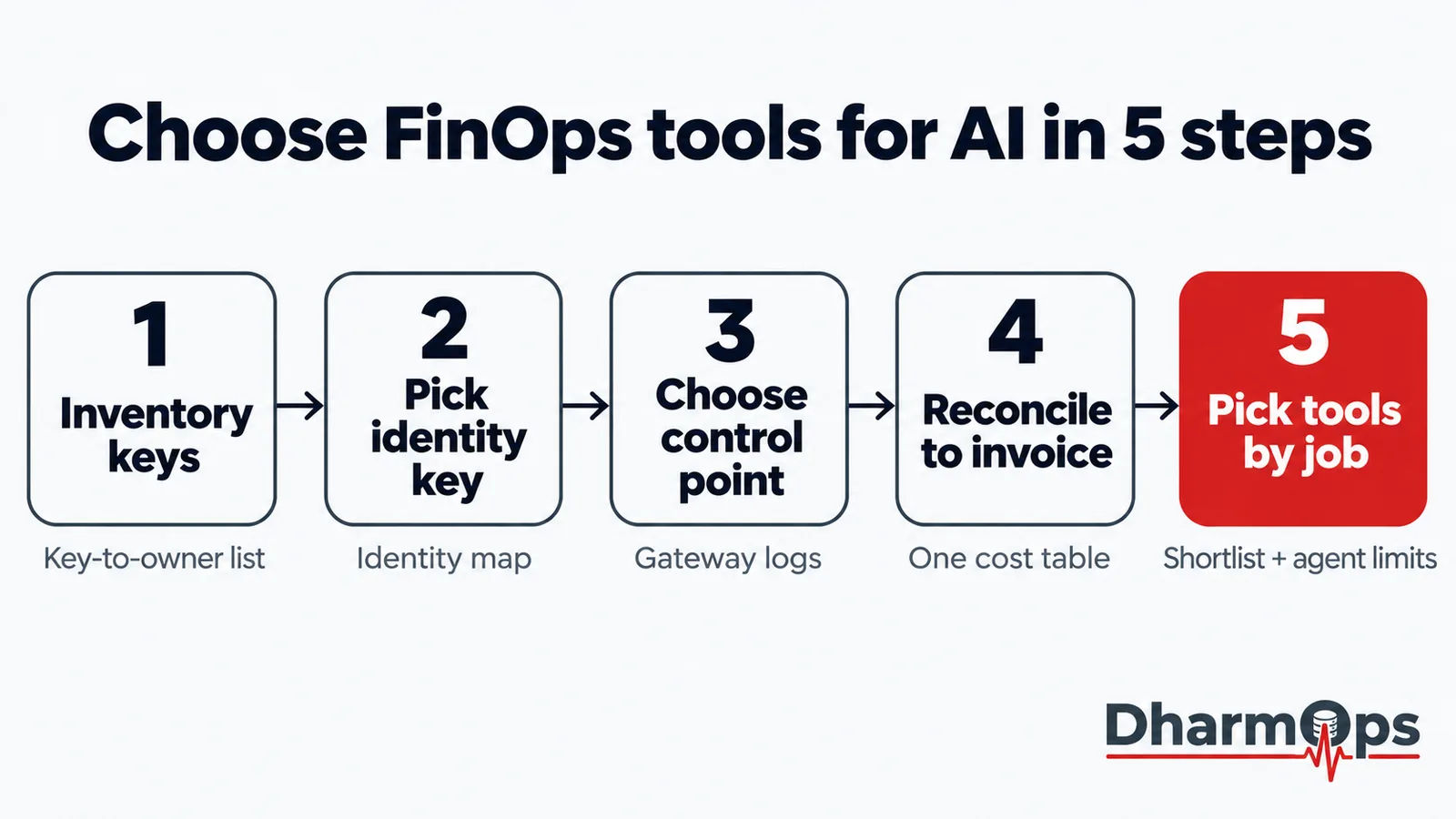
How to choose FinOps tools for AI in 5 steps
Tool demos all look alike. These five steps decide which one fits before you sit through any of them.
Step 1: Inventory every AI account and key
List every provider account, API key, coding-tool seat and cloud AI service. The Foundation calls direct APIs "the hardest AI channel to manage" because accounts get opened "by individual developers with a credit card before Procurement knows they exist." Map each key to one team, app and cost center. Track one number: the share of AI spend with a named owner.
Step 2: Pick the identity key
Decide what ties spend to a person or team: API key, cloud principal or email. Every later join depends on it, and FOCUS 1.5's requester attribution assumes you have one.
Step 3: Choose the control point
Pick per-team keys, a gateway, or both. The Foundation calls a central gateway that sets model policy and attaches cost metadata the decision "most likely to sustain savings across the organization." If you use LiteLLM budgets, give it a database.
Step 4: Land costs in one table and reconcile to the invoice
Pull provider exports, gateway logs and warehouse system tables into one FOCUS-shaped table. Then check that it adds up to the invoices. If it doesn't, no dashboard built on it will hold up in a finance review.
Step 5: Pick tools by job, and set agent authority limits
Now use the jobs above. Choose the fewest tools that cover the jobs you actually have. For any agent that can act, write down what it can do alone, what needs approval, and who approves.
Want Someone to Build the Attribution Layer?
We'll map your keys to owners, set up the gateway logging and the reconciled cost table, then keep running it with you each month.
Book a Discovery CallMistakes to avoid when buying a FinOps tool for AI
Expecting per-feature cost from a platform alone
FinOps platforms attribute AI spend by key or project. Per-feature cost needs a gateway, per-team keys or request-level data underneath.
Trusting a gateway budget that has no database
LiteLLM's max_budget fails open without a database. The proxy logs a warning at startup and keeps serving requests past the limit.
Assuming the agent will fix costs on its own
AWS FinOps Agent files tickets. Azure Copilot and Gemini Cloud Assist answer questions. Of the agents covered here, only Vantage executes changes, and it does so with approval.
Watching daily spend for agent loops
An agent loop burns through tokens in hours. Alert on tokens per minute at the application level, not on the daily bill.
Reading "supports FOCUS" as "AI costs compare"
Model identity and cache labels arrive in FOCUS 1.5. Until providers emit them, someone maps meter names by hand. Ask vendors which FOCUS version they emit, and for which providers.
Buying commitments before you have a baseline
The Foundation's lever order is right-size models, then caching and batching, then commitments. In its token cost paper, model right-sizing and routing typically saves 60 to 90%, and prompt caching 50 to 90% on cached tokens. Commitments come last for a reason.
Where to start
- This month: inventory your AI accounts and keys, and measure the share of AI spend with a named owner.
- Before your next FinOps tool renewal: ask whether it attributes AI spend below key or project.
- After December 3, 2026: ask each vendor when it emits FOCUS 1.5 model and cache labels.
- Before you turn on an agent that can act: write its authority limits and name the approver.
How we help with this
DharmOps starts with a 30-minute discovery call. If it's a fit, the diagnostic follows: we inventory your AI accounts and keys, map spend sources, and measure how much of your AI spend has a named owner.
Then we build the layer underneath your tools as part of data infrastructure FinOps: per-team keys or gateway logging, Snowflake and Databricks system-table models, and a FOCUS-shaped cost table that reconciles to your invoices. We stay on after that, with a monthly anomaly review and model right-sizing review on whichever tool you chose.
Book a Discovery CallFrequently Asked Questions
What are FinOps tools?
FinOps tools collect cost and usage data, allocate it to owners, and help teams reduce it. The FinOps Foundation groups them into provider consoles, gateways, observability tools, FinOps platforms and custom data warehouses. Each splits spend at a different depth, from key or project down to a single request.
What is AI for FinOps?
AI for FinOps is "applying generative and agentic AI to FinOps work", in the FinOps Foundation's words. Examples include AWS FinOps Agent finding the cause of a cost spike and Vantage's agent buying commitments with approval.
What is FinOps for AI?
FinOps for AI is managing the cost and value of AI spend: model APIs, cloud AI services, AI coding tools, GPUs and AI inside SaaS. It applies the usual FinOps practices to six channels that bill differently and keep their data in different places.
Which AI cost tracking tool should I use?
Pick by job. Most companies on one cloud start with that cloud's native agent. Teams that need one bill across clouds, model APIs and coding tools look at a cost platform such as Finout, Datadog or CloudZero. Teams that need per-team cost or hard caps add a gateway such as LiteLLM or Portkey.
How do you track AI spend across teams?
Give each team its own API key, or route calls through a gateway that stamps a team ID. Pick one identity key (key, principal or email) and use it everywhere. Then land provider, gateway and warehouse data in one table that reconciles to the invoice.
Can I set AI budgets for different teams?
Yes. LiteLLM sets budgets per team, team member, key and agent, and needs a database to enforce them. Portkey sets cost or token budgets that expire a key when reached, on its Enterprise plan. CloudZero attaches budgets and alerts to team and feature dimensions.
What is the difference between AI cost management and cloud cost management?
Cloud cost management covers resources that carry tags on one cloud bill. AI cost management also covers model APIs, coding-tool seats, GPUs and AI inside SaaS. Those bill by tokens, credits or seats, often outside the cloud bill and without tags.
How much does AWS FinOps Agent cost?
AWS doesn't charge for the agent while it's in preview. You pay the standard per-request rate for the AWS APIs it calls on your behalf. The agent covers AWS only and is "not yet in scope for AWS compliance programs."
What is FOCUS in FinOps?
FOCUS is the FinOps Foundation's open specification for billing data. It gives every provider's costs one schema, so allocation, budgeting and forecasting work the same way. Version 1.5, set for ratification on December 3, 2026, adds model identity, cache and direction labels, and requester attribution for AI costs.
How do I reduce AI token costs?
Start with the FinOps Foundation's lever order. Right-size models and route simple requests to smaller ones. Turn on prompt caching for stable system prompts and use batch APIs for work that doesn't need real-time answers. Trim context and cap output length. Buy volume commitments last, once you have a baseline.
Sources
- FinOps Foundation: State of FinOps 2026 Report
- FinOps Foundation: FinOps for AI Overview (updated Oct 28, 2026)
- FinOps Foundation: Managing AI Token Costs from Direct Model Provider APIs
- FinOps Foundation: Using AI for FinOps
- Tokenomics Foundation: FOCUS 1.5 Release Scope
- US Census Bureau: AI Use at U.S. Businesses (May 26, 2026)
- AWS: What is AWS FinOps Agent (preview)?
- AWS: AWS FinOps Agent public preview announcement (Jun 9, 2026)
- Microsoft Learn: Analyze, estimate and optimize cloud costs using Azure Copilot
- Google Cloud: Optimize costs with Gemini assistance
- Google Cloud: Optimize costs with FinOps hub
- Vantage: Vantage FinOps Agent
- Finout: FinOps for AI
- Finout: Pricing
- Datadog: Cloud Cost Management
- Datadog: Pricing, Cloud Cost Management
- Datadog: Agent Observability Cost
- CloudZero: AI cost governance
- Flexera: AI Cost Management
- nOps: AI Cost & Attribution
- DoiT: AI Hub
- IBM Community: New Cloudability Capabilities Bring Greater Visibility into AI Costs
- IBM Docs: Cloudability AI Vendor Data Mapping
- Kion: FinOps+ v4.0 announcement (Nov 23, 2026)
- LiteLLM: Budgets, Rate Limits
- Portkey: Budget Limits
- ProsperOps: How it Works
- OpenCost: Specification
- IBM Docs: Kubecost GPU Optimization
- Snowflake: AI cost management and governance
- Databricks: Track model usage (updated Nov 20, 2026)
- Helicone: Cost Tracking & Optimization
- r/FinOps: "My CFO asked me to break our AI spend down by team and I couldn't do it." (Aug 24, 2026)
- r/ClaudeCode: "Our average Claude Code cost per developer is $4 a day and that number is useless." (Oct 7, 2026)
How we built this list: every tool entry comes from that vendor's own documentation, product page or announcement, read on 25 and 26 November 2026. Survey figures come from the FinOps Foundation's State of FinOps 2026 and the US Census Bureau's Business Trends and Outlook Survey. Tools are grouped by the job they do, not ranked.
Get a Straight Answer on Your Setup
Tell us what you're running into. We read every message personally and reply within 24 hours with times for a 30-minute discovery call.